ARTS #001
ARTS #001
ARTS is an activity initiated by
由左耳朵耗子--陈皓: Do at least one leetcode algorithm question every week, read and comment on at least one English technical article, learn at least one technical skill, and share an article with opinions and thoughts. (That is, Algorithm, Review, Tip, and Share are referred to as ARTS) and persist for at least one year.
ARTS 001
This is the first article, and it is relatively poorly written. I hope it will get better and better in the future.
Algorihm algorithm question
leetcode algorithm question 344 Reverse String (reverse string)
Write a function that takes a string as input and returns the string reversed.
Example:
Given s = "hello", return "olleh".
请编写一个函数,其功能是将输入的字符串反转过来。
示例:
输入:s = "hello"
返回:"olleh"
This question is relatively simple and can be implemented as follows:
char* reverseString(char* s) {
    int len=strlen(s);
    int mid=len/2;
    for(int i=0,j=len-1;i<mid,i<j;i++,j--){
        char tmp;
        tmp=s[i];
        s[i]=s[j];
        s[j]=tmp;
    }
    return s;
}
It can also be implemented in other ways, such as a stack. It should be noted that using a stack to implement it requires twice the memory space.
Review
The following article comes from: https://littlebitesofcocoa.com/280-flowing-text-around-images-with-exclusion-paths;. It talks about how to achieve the effect of text wrapping pictures, which is quite practical in development.
Flowing Text Around Images With Exclusion Paths (Use the exclusionPaths method to wrap text around images)
Text is a huge part of iOS apps. Today we’ll look at one way we can polish up the text in our apps, by allowing it to naturally “flow” around objects. Let’s begin.
Text is an important part of iOS apps. Today we’re going to look at what we can do with text in an app by allowing it to “flow” naturally around an image. Let’s get started.
We’ll start with a “before” picture. Here we’ve got a basic setup with some text and an image in the top right corner. Nothing too fancy here, just a regular UITextView and UIImageView: We’ll start with the “before” pictures. Here we have a common layout with some text and an image in the upper right corner. Nothing special here, just regular UITextView and UIImageView:
let imageView = UIImageView(image: UIImage(named: "steve"))
let textView = UITextView(frame: .zero)
textView.text = "Here's to the crazy ones..."
<img src=“/img/15330428668213.jpg” width=“50%” height=“50%” />
This looks fine. But our text is needlessly narrow. It’d be great if we could make the text expand to the full width of the device. We’ll change our Text View’s layout so it does: Looks good. But the width of our text display becomes narrower. It would be great if we could extend the text to the full width of the device. We will change the layout of the text view to look like this:
<img src=“/img/15330428846540.jpg” width=“50%” height=“50%” />
Well, we’re getting closer. Now we just need a way to make the text “flow” or “wrap” around our image. We’ll start by getting the frame of the image view, then we’ll create a path from it:
let imagePath = UIBezierPath(rect: imageView.frame) Finally, we’ll set our new path as one of the exclusionPaths of our Text View’s textContainer:
textView.textContainer.exclusionPaths = [imagePath]
Well, we’re getting closer. Now we just need a way to make the text “flow” or “wrap” around our image. We first get the frame of the image view, then we will create a path from it:
let imagePath = UIBezierPath(rect:imageView.frame) Finally, we set the new path to one of the exclusionPaths of the Text View’s textContainer:
textView.textContainer.exclusionPaths = [imagePath]
<img src=“/img/15330429892173.jpg” width=“50%” height=“50%” />
Success! Since exclusionPaths is an Array, we can flow text around as many shapes as we want! Success! Since exclusionPaths is an array, we can flow the text around it as needed!
<img src=“/img/15330430319407.jpg” width=“50%” height=“50%” />
Demo:https://github.com/danminyi/TextAroundImages
Tip
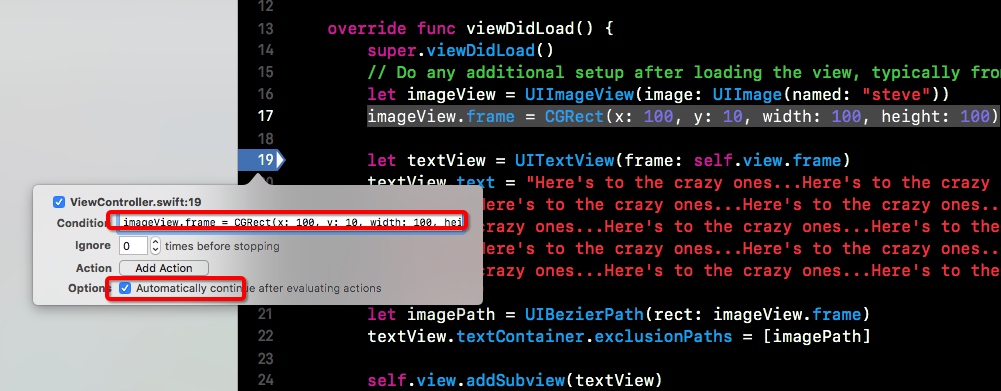
When using Xcode, sometimes I want to change the value of a certain variable during debugging. For example, in the picture below, I want to modify the value of imageView. The general approach is to modify and rerun. This is too inefficient. In addition to using third-party tools such as reveal and injection, you can also Use the method that comes with xcode - breakpoint, as shown in the figure below, you can directly modify the frame of the imageView. After checking Automaticlly below, the breakpoint will not pause when you reach it, and you can run it directly. Isn’t it very convenient, especially when debugging the parameter passing function? It is so convenient.
Share
This week I am watching “How the Internet is Connected” (https://book.douban.com/subject/26941639/) I haven’t finished the second chapter yet. I have to say that this book is really suitable for network beginners. I have read some network books before, but I have not been able to finish them. Maybe my foundation is too poor. This book first explains the whole picture of the network, and then explains every detail. From the URL you enter in the browser to the server response, to the browser displaying the data, every step of the process has an easy-to-understand explanation. I also read Illustrated HTTP and Illustrated TCP/IP before, but I didn’t quite understand them; many books only explained one point, like a blind man touching an elephant, unable to consider the overall situation; or they directly explained the principles without combining them with daily usage scenarios, making it difficult for people to understand. This book starts with the scenarios you are most familiar with, and then talks about the principles. Of course, this book is aimed at network beginners, so many knowledge points cannot be explained too deeply, so this book is only suitable for beginners. I have done socket programming before, but I never understood the specific process. After reading the first two chapters, I felt suddenly enlightened. If you have always wanted to learn about the Internet in depth, but after reading a lot of books, you still feel that you have not gotten started or are confused and have no concept of the overall network, then this book is suitable for you.
What to read next
Want more posts about ARTS?
Posts in the same category are usually the best next step for reading more on this topic.
View same categoryWant to keep following #iOS?
Tags are useful for related tools, specific problems, and similar troubleshooting notes.
View same tagWant to explore another direction?
If you are not sure what to read next, return to the homepage and start from categories, topics, or latest updates.
Back home