ARTS #002
ARTS #002
ARTS is an activity initiated by
由左耳朵耗子--陈皓: Do at least one leetcode algorithm question every week, read and comment on at least one English technical article, learn at least one technical skill, and share an article with opinions and thoughts. (That is, Algorithm, Review, Tip, and Share are referred to as ARTS) and persist for at least one year.
ARTS 002
This is the second article, and it is relatively poorly written. I hope it will get better and better in the future.
Algorihm algorithm question
leetcode algorithm question 242 Valid Anagram (verify whether it is an anagram)
Given two strings s and t , write a function to determine if t is an anagram of s.
Example 1:
Input: s = "anagram", t = "nagaram"
Output: true
Example 2:
Input: s = "rat", t = "car"
Output: false
Note:
You may assume the string contains only lowercase alphabets.

给定两个字符串 s 和 t ,编写一个函数来判断 t 是否是 s 的一个字母异位词。
示例 1:
输入: s = "anagram", t = "nagaram"
输出: true
示例 2:
输入: s = "rat", t = "car"
输出: false
说明:
你可以假设字符串只包含小写字母。
The initial idea is to sort first and then compare, that is, sort the two strings first, and then compare whether they are equal. This verification method is the most efficient. You can use bubble sort, selection sort, insertion sort, etc. when sorting. Although the complexity of these three sorting algorithms is O(n<sup>2</sup>), the test found that when the amount of data is large, insertion sort is much faster than the other two, which is not at the same order of magnitude. The implementation of insertion sort is as follows:
char* insertionSort(char* str) {
    for (int j = 1; j < strlen(str); j++) {
        char *insertionChar = str + j;
        char iChar = *insertionChar;
        char * compareChar = insertionChar;

        for (int i = j-1; i >=0; i--) {
            if (iChar < *(str + i)) {
                compareChar = str + i;
                *(compareChar +1) = *compareChar;
            }
            else{
                break;
            }
        }
        *compareChar = iChar;
    }
    return str;
}

bool isAnagram(char* s, char* t) {
    if (strlen(s) != strlen(t)){
        return false;
    }
    char *s1 = insertionSort(s);
    char *s2 = insertionSort(t);

    if (strcmp(s1,s2)) {
        return false;
    }
    else{
        return true;
    }
}
But it cannot pass at all in leetcode. The length of the test data string on leetcode is 100Kb. I measured it locally and it took nearly 20 seconds using insertion sort. But if I use bubble and selection sort, it took me more than an hour to finish.
If this method doesn’t work, you can try another idea. You can count whether the character types and numbers contained in the string are equal. For example, the s string contains 10 letters a, 5 letters b, and 8 letters k. If the same is true for the t string, then s is an anagram of t. Implemented as follows
bool isAnagram(char* s, char* t) {
    if (strlen(s) != strlen(t)){
        return false;
    }

    int af[26]= {0};
    while (*s) {
        af[*s++ - 'a']+=1;
    }
    while (*t) {
        af[*t++  - 'a']-=1;
    }

    for (int i = 0; i<26; i++) {
        if (af[i] != 0) {
            return false;
        }
    }
    return true;
}
When implementing this, only one array is used instead of two arrays to count the number of characters appearing in two strings respectively. This can avoid out-of-bounds situations due to too many occurrences of a certain character.
Review
The following article comes from: https://littlebitesofcocoa.com/251-face-aware-image-views-with-aspectfillfaceaware;. It talks about using aspectfillfaceaware to realize that when setting a picture for imageView, if the picture contains a face, the face can be automatically displayed in the center.
Face Aware Image Views with AspectFillFaceAware (use AspectFillFaceAware to let imageView recognize faces)
When using UIImageViews, sometimes the built-in content modes can cramp our style.
When using UIImageViews, sometimes the built-in content mode destroys our style and cannot meet our needs.
Many times, we’re displaying photos of people. In these cases, it’d be great if the image view could somehow be told to intelligently crop the photo around the person’s face.
Many times, we show photos of people. In these cases, it would be great if the image view could somehow intelligently crop the photo around the person’s face.
Today we’ll check out a library from Beau Nouvelle called AspectFillFaceAware. It’s super simple, let’s take a look.
Today we are going to look at a class library from Beau Nouvelle called AspectFillFaceAware. It’s very simple, let’s take a look.
AspectFillFaceAware is essentially just an extension on UIImageView. It provides two ways to configure an image view to be “face aware”.
AspectFillFaceAware is essentially just an extension of UIImageView. It provides two methods of configuring the image view for “face recognition”.
The first is in Interface Builder, we can enable the feature by flipping on the feature in the Inspector. (Not seeing the option? Run your project once, then it should appear).
The first way is in Interface Builder, we can enable the feature by flipping through Features in the Inspector. (Don’t see the option? Run your project once and it should appear).
<img src=“/img/15334638167496.jpg” width=“50%” height=“50%” /> Here’s the how it looks:

We can also enable the functionality in code by setting the image view’s image using this new function:
We can also use this new feature through code:
imageView.set(image: avatar, focusOnFaces: true) We can even throw a quick corner radius on the image view’s layer to try out the “face aware” functionality on a circular view. (i.e. user avatars):
We can even throw a quick corner radius on the image view’s layer to try out the “face recognition” feature on the circular view. (i.e. user avatar):
let radius = imageView.bounds.size.width / 2.0 imageView.layer.cornerRadius = radius
 Under the hood, the library is using a low accuracy CIDetector with a type of CIDetectorTypeFace to handle the actual face detection. Want to dive deeper here? We covered CIDetectors way back in Bite #87.
Under the hood, the library is using a low-precision CIDetector with type CIDetectorTypeFace to handle the actual face detection. Want to delve deeper? We introduced the CIDetectors approach in Bite #87.
Tip
Introduce the method of using Proxifier and shadowsocks to achieve secondary proxy Internet access.
Some companies need to go through a proxy to access the Internet. In this case, we cannot use shadowsocks to access the Internet through a proxy. For example, the company I am currently in uses a proxy to access the Internet. If you want to access the external network, you must proxy to the company’s server to access the Internet. In this case, using shadowsocks directly will not work.
Is it possible to find a way to let shadowsocks also use a proxy? So I found the software Proxifier.
Proxifier, the function of this tool is to take over all requests issued by all running applications, and then you can control whether an application uses a proxy, so that applications that do not support proxy can also use a proxy.
Originally, the ss client (shadowsocks) directly accesses the ss proxy server. Through Proxifier, the ss client can be controlled to go to the company proxy first, and then to the ss proxy server. The general process is as follows
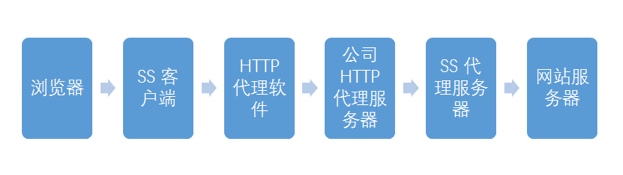
- The setting process is as follows:
Open Proxifier, select the Proxies tab to set the company’s HTTP proxy and local Socks5 proxy:
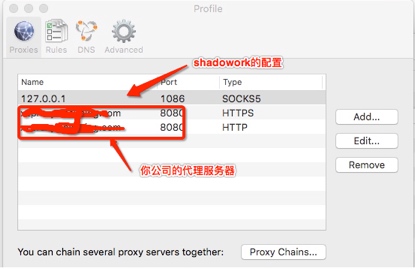
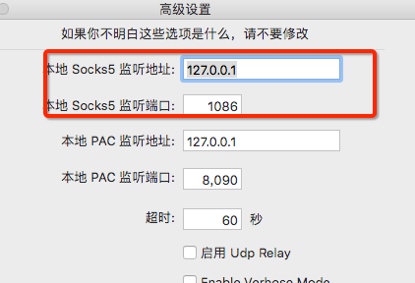
The port 127.0.0.1 can be opened to view the advanced configuration of ShadowSocks.
 When you start the ShadowSocks client, you will find that Proxifier automatically captures the application named ss-local, which is the SS client opened by ShadowSocks, and sets its proxy rules to the previously created company proxy:
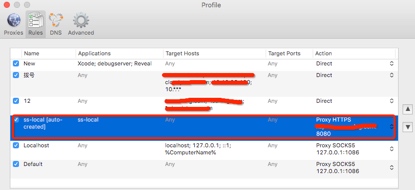 Then let Localhost and Default go to ss-local (the last two items in the picture).
You can see that the first three configurations are Direct. Some websites or applications that do not require a proxy can be set up like this. If you find that some applications have problems after enabling Proxifier, it is probably caused by the proxy. For example, after starting Proxifier, I found that it was stuck when I used Xcode to run the C program. Later, I found that when Xcode ran the C program, it would automatically start a local service of debugserver. Since I set the default proxy, the service could not communicate normally. I changed the debugserver to Direct and it can run normally. You can see that Proxifier can directly specify whether an application name uses a proxy or whether a certain IP uses a proxy. It is indeed very convenient to use.
Reference article: http://www.devtalking.com/articles/shadowsocks-guide/ http://blackwolfsec.cc/2016/09/19/Proxifier_Shadowshocks/ https://github.com/cyfdecyf/cow/blob/master/doc/sample-config/rc https://www.latoooo.com/xia_zhe_teng/179.htm http://haoweiguang.me/2017/05/08/Mac下shadowsocks全自动地代理翻墙/ https://blog.e9china.net/tufan/macshanganzhuangcowproxyfanqiangjiaocheng.html
Share
I recently changed a company, a company with serious overtime work. When I first came here, I always wanted to leave, but after thinking about it, I decided not to leave. A company that can be so big (I heard that there are nearly 20,000 people in R&D) must have something worth learning, so I decided to calm down and study. As for overtime work, you can learn and improve yourself while working overtime. Ability, the reason why I came to this company is not because my technical level is not good enough, so I have to improve myself as soon as possible. I don’t know where I saw a sentence: “You must endure it or get out of here.”
In fact, many things are like this. When your ability is not worthy of your ambition, what you have to do is to improve your ability instead of complaining about the environment.
What to read next
Want more posts about ARTS?
Posts in the same category are usually the best next step for reading more on this topic.
View same categoryWant to keep following #iOS?
Tags are useful for related tools, specific problems, and similar troubleshooting notes.
View same tagWant to explore another direction?
If you are not sure what to read next, return to the homepage and start from categories, topics, or latest updates.
Back home