ARTS #003
ARTS #003
ARTS is an activity initiated by
由左耳朵耗子--陈皓: Do at least one leetcode algorithm question every week, read and comment on at least one English technical article, learn at least one technical skill, and share an article with opinions and thoughts. (That is, Algorithm, Review, Tip, and Share are referred to as ARTS) and persist for at least one year.
ARTS 003
This is the third article, and it is relatively poorly written. I hope it will get better and better in the future.
Algorihm algorithm question
leetcode algorithm question 151 Reverse Words in a String (reverse words in a string) Could it be: Moderate
Given an input string, reverse the string word by word.

Example:

Input: "the sky is blue",
Output: "blue is sky the".
Note:

A word is defined as a sequence of non-space characters.
Input string may contain leading or trailing spaces. However, your reversed string should not contain leading or trailing spaces.
You need to reduce multiple spaces between two words to a single space in the reversed string.
Follow up: For C programmers, try to solve it in-place in O(1) space.

给定一个字符串,逐个翻转字符串中的每个单词。

示例:

输入: "the sky is blue",
输出: "blue is sky the".
说明:

无空格字符构成一个单词。
输入字符串可以在前面或者后面包含多余的空格,但是反转后的字符不能包括。
如果两个单词间有多余的空格,将反转后单词间的空格减少到只含一个。
进阶: 请选用C语言的用户尝试使用 O(1) 时间复杂度的原地解法。
If you don’t consider the space problem, this algorithm is relatively simple. Flip the entire string, and then flip each word. The difficulty of this question is how to remove excess spaces, including spaces at the beginning, spaces at the end, and excess spaces between words. The implementation is as follows:
void ReverseString(char* str,int min,int max) {
    int i = min;
    int j = max;
    while (i < j) {
        char temp = * (str + i);
        * (str + i) = * (str + j);
        * (str + j)  = temp;
        i++;
        j--;
    }
}

//翻转字符串
void reverseWords(char *fdg) {
    RemoveEmptyChar(fdg);
    ReverseString(fdg,0,strlen(fdg) -1);
    int i = 0;
    int j = 0;
    while (*(fdg + j)) {
        if (*(fdg + j) == ' ') {
            ReverseString(fdg,i,j-1);
            i=j+1;
        }
        j++;

    }
    ReverseString(fdg,i,j-1);
}

//去掉空格
void RemoveEmptyChar(char* str) {
     //先去掉尾部的空格
    int j  = strlen(str) -1;
    while (*(str + j) == ' ') {
        *(str + j) = '\0';
        j--;
    }

    //去掉头部的空格
    int i = 0;
    while (*(str + i) == ' ') {
        i++;
    }
    if(i > 0){
        int count = 0;
        while ((count < strlen(str) - i) && *(str +i + count)) {
            *(str + count) = *(str +i + count);
            count++;
        }
        *(str + count) = '\0';
    }

    //去掉中间的空格
    int m  = 0;
    int flag = 0;
    while (m < strlen(str)) {
        if (*(str + m) == ' '){
            flag++;
            m++;
            continue;
        }
        if (flag > 1) {
            int count = 0;
            while ((count < strlen(str) -m)) {
                *(str + m - flag + 1 + count) = *(str + m + count);
                count++;
            }
            *(str + m - flag + 1 + count) = '\0';
            m = m - flag ;
        }
        flag = 0;
        m++;
    }
}
This algorithm has a problem in leetcode, which is that it will time out. As you can see from the above, there is no room for optimization in the method of flipping strings. The timeout should be caused by the method of removing spaces. The implementation of the method of removing spaces is that if extra spaces are encountered, the string after the spaces will be moved forward. In the worst case, the number of character moves should be approximately: the second character is moved once, the third character is moved twice, and the nth character is moved n-1 times, the time complexity is O(n<sup>2</sup>). In fact, there is no need to move so many times. One character only needs to be moved once. The improved method of removing spaces is as follows:
void RemoveEmptyChar1(char* str) {
    char * i = str;
    char * j = str;
    while (*i  && (*i == ' ')) {
        if (i == str) {
            j = i;
            while (*j && (*j == ' ')) {
                j++;
            }

            if (!*j) {//说明全是空格
                i = j;
            }

            while (*j && (*j != ' ')) {
                *i = *j;
                *j = ' ';
                i++;
                j++;
            }

        }
        else{
            if (*(i+1) == ' ') {
                j = i+ 1;
                while (*j && (*j == ' ')) {
                    j++;
                }
                i++;

                while (*j && (*j != ' ')) {
                    *i = *j;
                    *j = ' ';
                    i++;
                    j++;
                }
            }
            else{
                i++;
            }
        }
    }

    //先去掉尾部的空格
    int m  = strlen(str) -1;
    while (*(str + m) == ' ') {
        *(str + m) = '\0';
        m--;
    }
}
After the improvement, the running time of leetcode is 4ms, and the best answer submitted on leetcode is 0ms. I took a look and found that the method of flipping the string is the same as mine. The difference is the method of removing spaces. The method of removing spaces in 0ms is as follows:
void updateString(char *s) {
    int i = 0;
    int end = 0;
    int index = 0;
    bool flag = false;
    while (s[i] == ' ') {
        i++;
    }
    while (s[i] != '\0') {
        if (s[i] == ' ') {
            flag = true;
        } else {
            if (flag) {
                index = end + 1;
                end = index + 1;
                flag = false;
            } else {
                index = end;
                end++;
            }
            if (i > index) {
                s[index] = s[i];
                s[i] = ' ';
            }
        }
        i++;
    }
    s[end] = '\0';
}
It can be seen that there is no loop nesting in his implementation, which means that he only used one loop to get it done. When he implemented it, he moved at most one character at a time. As for my implementation above, in a loop, if it needs to be moved, at least one word will be moved, all with nested loops.
Review
The following article comes from: https://littlebitesofcocoa.com/251-face-aware-image-views-with-aspectfillfaceaware;. It talks about using aspectfillfaceaware to realize that when setting a picture for imageView, if the picture contains a face, the face can be automatically displayed in the center.
Face Aware Image Views with AspectFillFaceAware (use AspectFillFaceAware to let imageView recognize faces)
When using UIImageViews, sometimes the built-in content modes can cramp our style.
When using UIImageViews, sometimes the built-in content mode destroys our style and cannot meet our needs.
Many times, we’re displaying photos of people. In these cases, it’d be great if the image view could somehow be told to intelligently crop the photo around the person’s face.
Many times, we show photos of people. In these cases, it would be great if the image view could somehow intelligently crop the photo around the person’s face.
Today we’ll check out a library from Beau Nouvelle called AspectFillFaceAware. It’s super simple, let’s take a look.
Today we are going to look at a class library from Beau Nouvelle called AspectFillFaceAware. It’s very simple, let’s take a look.
AspectFillFaceAware is essentially just an extension on UIImageView. It provides two ways to configure an image view to be “face aware”.
AspectFillFaceAware is essentially just an extension of UIImageView. It provides two methods of configuring the image view for “face recognition”.
The first is in Interface Builder, we can enable the feature by flipping on the feature in the Inspector. (Not seeing the option? Run your project once, then it should appear).
The first way is in Interface Builder, we can enable the feature by flipping through Features in the Inspector. (Don’t see the option? Run your project once and it should appear).
<img src=“/img/15334638167496.jpg” width=“50%” height=“50%” /> Here’s the how it looks:
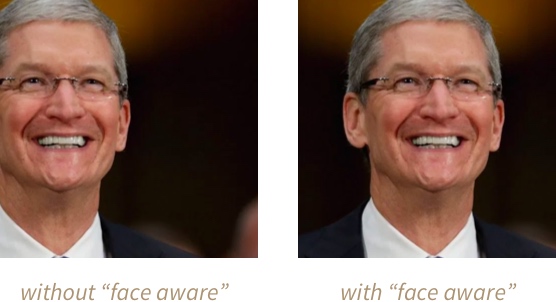
We can also enable the functionality in code by setting the image view’s image using this new function:
We can also use this new feature through code:
imageView.set(image: avatar, focusOnFaces: true) We can even throw a quick corner radius on the image view’s layer to try out the “face aware” functionality on a circular view. (i.e. user avatars):
We can even throw a quick corner radius on the image view’s layer to try out the “face recognition” feature on the circular view. (i.e. user avatar):
let radius = imageView.bounds.size.width / 2.0 imageView.layer.cornerRadius = radius
 Under the hood, the library is using a low accuracy CIDetector with a type of CIDetectorTypeFace to handle the actual face detection. Want to dive deeper here? We covered CIDetectors way back in Bite #87.
Under the hood, the library is using a low-precision CIDetector with type CIDetectorTypeFace to handle the actual face detection. Want to delve deeper? We introduced the CIDetectors approach in Bite #87.
Tip
####1 How to set breakpoints for system methods when using Xcode to debug? The answer is breakpoint. For example, to setContentInset method, break point, you can use the following command:
breakpoint set -S setContentInset:
For details, please refer to: https://www.jianshu.com/p/8e9fc9a8ab78?from=jiantop.com
####2 UITableView optimization UITableView optimization can be said to be a topic that will never go out of style in iOS development. Here is a summary of optimization ideas. You can Google the specific methods yourself. The general idea is as follows:
-
Reduce the amount of CPU/GPU calculations 1.1 Cell reuse mechanism 1.2 Cache the cell height and the frame of the controls in the cell in the model 1.3 Reduce the level of controls inside the cell 1.4 Achieve the rounded corner effect of the avatar by covering the rounded corner image
-
Load cells on demand 2.1 Only load visible cells in the cellForRow: method 2.2 Monitor the fast scrolling of the tableview and save the indexes of the three rows before and after the target scroll range
-
Asynchronous processing of cells 3.1 Asynchronous loading of network images 3.2 Draw local pictures asynchronously 3.3 Asynchronous drawing of UIView 3.4 Asynchronous drawing of NSString 3.5 Asynchronous drawing of UILabel
Share
Sharing a question today, I saw this question in a group today
<img src=“/img/20180809225650469.png” width=“50%” height=“50%” />
Which one will you choose? Choose D?
From the past knowledge, I should choose D, but when I saw someone saying to choose B, I gave it a try. The test code is as follows:
- (void)viewDidLoad {
    [super viewDidLoad];
    for (int i =0; i < MAXFLOAT; i++) {
         @autoreleasepool{
             UIImage *img = [[UIView alloc] init];// A

             UILabel *lab = [[UILabel alloc] init];// B

             NSString *str = @"abc";
             str = [str stringByAppendingString:@"xyz"];// C
        }
    }
}
The result is really B. B will cause the memory to keep increasing. After testing, it was found that regardless of the autoreleasepool, B will cause the memory to keep increasing. The other two will not cause the memory to keep increasing. It is strange. It stands to reason that after adding @autoreleasepool, the memory will be automatically released when it reaches a certain value. The explanation in the group is:
- Related to threads
- Apple has optimized the for loop. If it is not UIView and its subclasses, it will be processed in a sub-thread.
- The UIView object will be automatically created on the main thread
- If you put UIImage in the main thread for processing, the memory will still soar.
- The release method of the main thread’s automatic release pool is different from that of the child thread.
But I still don’t understand why: 1 lab is a local variable, except that the right bracket of the for loop should be released. 2 Added @autoreleasepool, which should be released when the memory reaches its peak. ? ? ?
What to read next
Want more posts about ARTS?
Posts in the same category are usually the best next step for reading more on this topic.
View same categoryWant to keep following #iOS?
Tags are useful for related tools, specific problems, and similar troubleshooting notes.
View same tagWant to explore another direction?
If you are not sure what to read next, return to the homepage and start from categories, topics, or latest updates.
Back home