ARTS #013
ARTS #013
ARTS is an activity initiated by
由左耳朵耗子--陈皓: Do at least one leetcode algorithm question every week, read and comment on at least one English technical article, learn at least one technical skill, and share an article with opinions and thoughts. (That is, Algorithm, Review, Tip, and Share are referred to as ARTS) and persist for at least one year.
ARTS 013
This is article 13
Algorihm algorithm question
479. Largest Palindrome Product
Difficulty: Easy
Find the largest palindrome made from the product of two n-digit numbers.
Since the result could be very large, you should return the largest palindrome mod 1337.
Example:
Input: 2
Output: 987
Explanation: 99 x 91 = 9009, 9009 % 1337 = 987
Note:
The range of n is [1,8].
Solution
Language: C
The label of this question is easy, which is more difficult for me than the difficult questions I did before. After I first saw the easy label, I didn’t pay much attention to it, so I just used brute force search to do it, traverse all the number combinations, find the product, and then judge whether it is a palindrome number. The result is a timeout. I tested it and it took several minutes to run when n=5.
int largestPalindrome(int n) {
    if (n==1) {
        return 9;
    }
    long int left = 0;
    for (long int i = 0; i < n; i++) {
        left = left*10 + 9;
    }
    long int right = left;
    long int low = pow(10,n-1);

    int maxpalindrome = 0;

    for (; left >0; left--) {
        right=left;
        for (; right >0; right--) {
            int count = left * right;
            int count1=count;
            int palindrome = 0;
            for (; count >0; ) {
                palindrome = palindrome *10 + count%10;
                count = count/10;
            }

            if (palindrome == count1) {
                if (palindrome > maxpalindrome) {
                    maxpalindrome =palindrome;
                }
            }
        }

    }
        return maxpalindrome%1337;;
I can only change my mind. I first find the number of palindromes, and then split them to see if they meet the requirements. The result still times out. I printed it and found that there are quite a lot of palindromes.
int largestPalindrome(int n) {
    if (n==1) {
        return 9;
    }
    long int left = 0;
    for (long int i = 0; i < n; i++) {
        left = left*10 + 9;
    }
    long int right = left;

    long int low = pow(10,n-1);

    for (long int i = left * right; i>0; i--) {
        long int count = i;
        long int count1=count;
        long int palindrome = 0;
        for (; count >0; ) {
            //找回文数  1234 4321
            palindrome = palindrome *10 + count%10;
            count = count/10;
            if (count<palindrome) {
                break;
            }

            if (count == palindrome) {
                if (count > right) {
                    break;
                }
                for (long int j = left; j>count1/right; j--) {
                    if (count1%j ==0 ) {
                        return count1 % 1337;
                    }

                }
            }
        }

    }
    return 0;
}
In the end, I still couldn’t come up with an answer that didn’t time out. The answers below are from others. Use them to learn from:
long int creatPalindrome(long int num,int n){
    long int p=num*pow(10,n);
    for(int i=0;i<n;i++){
        p=p+(num/(long int)pow(10,n-i-1))*(long int)pow(10,i);
        num=num%(long int)pow(10,n-i-1);
    }
    return p;
}
int largestPalindrome(int n) {
    if(n==1){return 9;}
    long int p=pow(10,n)-1;
    long int q=p;
    long int temp=pow(10,n-1);
    long int ret=0;
    long int ret1=0;
    while(p>=temp){
        ret=creatPalindrome(p,n);
        for(int i=q;i>=temp;i--){
            ret1=ret/i;
            if(ret1>=i){break;}
            if(ret1>=temp&&ret%i==0)
            {
                return ret%1337;

            }
        }
        p--;
    }
    return NULL;
}
Review
1.This article comes from https://medium.freecodecamp.org/how-i-launched-an-ios-app-with-a-teenager-926b5a65a991 This article mainly talks about teaching a teenage child to implement an iOS swimming-related APP.
https://medium.freecodecamp.org/how-i-launched-an-ios-app-with-a-teenager-926b5a65a991
How I Launched an iOS App with a Teenager
How to go from Scratch to an iPhone app in the App store How to get an iPhone app from scratch in the App Store
As a follow up to two of my prior articles, (How to teach programming to teenagers and Beginner’s Guide to Raspberry Pi), I want to share my experiences in helping a teenager go from coding in Scratch to building and deploying an iOS app. As a follow-up to my two previous articles, (How to teach programming to teenagers and Beginner’s Guide to Raspberry Pi), I would like to share my experience helping a teenager go from coding from scratch to building and deploying an iOS app.
As mentioned in one of my prior articles, I noticed that teenagers have a strong desire to do something that feels more real. So, the natural question that repetitively came up in many of my classes was “Can we build an iPhone App?”. I felt that the time was right for the students to build an app, and I asked them each to pitch an idea. As mentioned in one of my previous articles, I’ve noticed that teenagers have a strong desire to do things that feel more authentic. So, a natural question that comes up over and over in many of my classes is “Can we develop an iPhone app?” I feel like now is the time for students to develop apps, and I ask each of them to come up with an idea.
A week later, one of the students came back with an idea and it seemed really really interesting, so we decided to take some time outside of the regular class time and build it together. And we ended up with a cool app called SwimGrader. A week later, one of the students came back with an idea that seemed really interesting, so we decided to spend some time outside of regular class time and do it together. We ended up developing a cool app called Swim Grader.
How did SwimGrader come about? What is SwimGrader about?
My student is an avid swimmer and has always been curious how good his swimming is. Assessing your own swimming ability is not really obvious, and you often need some expert to tell you how good you are. My student loves swimming and is always curious about how good his swimming skills are. Assessing your own swimming ability isn’t always obvious, and you often need some expert to tell you how good you are.
We all know that lowering lap time is the goal most athletes shoot for, so a lot of people attempt to do that. However, it is quite hard to know in detail what you must work on to achieve lower lap times. Of course, you can just try to kick faster and practice more to gain more swimming muscles, but that usually is not the best way to improve your swimming. We all know that lowering lap times is the goal of most athletes, so many try to do it. However, it’s quite difficult to know what you have to do to achieve lower lap times. Of course, you can try faster kicks and more exercises to gain more swimming muscle, but that’s usually not the best way to improve your swimming.
Coming from this, my student thought that people needed something that could pinpoint an area of swimming they should work on next. So, his brilliant idea was to build an app that could assess various aspects of your swimming and tell you which area you should work to improve. From this point, my students decided that people needed something to identify which area of swimming they should study next. So, his brilliant idea was to create an app that would assess every aspect of your swimming and tell you which areas you should improve.
Knowing from experience how hard it is to improve my swimming, I was really impressed by his idea. It was nothing that I had heard of before and it had a specific use case that could potentially benefit a lot of people. However, since my student had never built an iPhone app before, we decided to work on it together from scratch. Knowing from experience how difficult it was to improve my swimming, I was impressed by his ideas. This is not something I’ve heard of before and it has a specific use case that could potentially benefit a lot of people. However, since my students had never developed an iPhone app before, we decided to start from scratch together.
Getting started
Not being a competitive swimmer myself and also thinking that it would be a good thought exercise, I asked my student to come up with the design of the app and the metrics we could use to grade the swimmer in the app. Not being a competitive swimmer myself, and thinking this would be a good thinking exercise, I asked my students to come up with designs for the app, and metrics we could use to score swimmers within the app.This process ended up to be a really good learning experience. Not only did this exercise helped the student iron out the details of the project, but it also kept my and my student’s expectations in line. As mentioned in my articles about teaching teenagers, teenagers have high expectations about doing anything with programming. So, after talking through every detail from which data to collect, which pages to create, how each page transition works and which metrics to show, both of us were to clearly set our goals and our expectations. The process ended up being a great learning experience. This exercise not only helped students work out the details of the project, but also allowed me to align with students’ expectations. As I mentioned in my article about teaching teenagers, teenagers have high expectations for programming. So, after discussing in detail what data to collect, which pages to create, how each page conversion would work, and what metrics to show, we all had our goals and expectations clear.
And knowing the exact end-product we were planning to make helped the student stay constantly engaged. Knowing the exact end product we plan to produce helps students stay engaged.
Digressing a little bit from the main topic, we often learn things that we don’t know when we will ever apply in our lives. This can make us feel like we are walking through a long dark tunnel with no light at the end. We often learn things that we don’t know when we will apply to our lives. This can make us feel like we are walking through a long dark tunnel with no light at the end.
This is especially true when you are younger, as you are most likely being told to learn certain things. I believe that this causes many students to not get excited about what they learn. I learned that setting the right expectations by showing the end of the journey of a learning exercise really helps motivate students and increases the efficiency of the learning exercise itself. This is especially true when you are young, as you are most likely told to learn certain things. I think this results in many students not being interested in what they are learning. I learned that setting the right expectations by showing where the learning process will end is really helpful in motivating students and making the learning process itself more efficient.
So, back to the design and the metrics of the app that the student suggested: my student first suggested that the app, in general, should not add any overhead for the swimmer. He wanted to build an app that would be able to collect statistics without hampering the swimmer’s performance. So, back to the design and metrics of the student-suggested apps: My students first suggested apps that, in general, shouldn’t add any overhead to swimmers. He wanted to develop an app that would collect statistics without affecting a swimmer’s performance.
The student already had a measuring device in mind to serve this exact purpose, which I will share in the next section. After some discussion to come up with a minimal viable product, we decided that we should focus on collecting two specific metrics: head bops and turn speed. The student already had a measuring device in mind for this purpose, which I will share with you in the next section. After some discussion we came up with a minimum viable product and we decided we should focus on collecting two specific metrics: head BOP and turn speed.
Since head bops are a mostly extraneous movement that can reduce the efficiency of swimming, if we can simply count the number of head bops within some time interval, we thought that we could suggest a reduction in extraneous head movements. Since head knock is an extraneous movement that can reduce swimming efficiency, if we could simply count the number of head knocks over a period of time, we thought we could recommend reducing extraneous head movement.
We also agreed that fast turns are necessary for reducing lap times. So, if we could measure the time it takes the swimmer to make a turn at the end of the lane, we could grade the swimmer based on time. We also agree that fast cornering is necessary to improve lap times. So, if we can measure how long it takes a swimmer to turn at the end of the lane, we can score the swimmer based on that time.
Given this design and the idea, we only needed to start implementing it with the right sensor. With this design and idea in mind, we just need to start implementing it with the right sensors.
So, which hardware made SwimGrader possible? So, which hardware made SwimGrader possible?
Although the latest iPhones are waterproof, swimmers probably don’t want to risk taking their super expensive iPhones into the pool. So, my student suggested that we use a sensor from mbientlab and enclose it in a waterproof case. While the latest iPhones are waterproof, swimmers may not want to risk taking a super expensive iPhone into the pool. So, my students suggested that we use a sensor from mbientlab and encapsulate it in a waterproof case.
This sensor allows you to collect various data from the environment and from your movements, as it houses an accelerometer, a gyroscope, a barometer, a thermometer and so on. Also, they have some sample code that you can use to bootstrap your application so you can immediately collect the data of interest. This sensor allows you to collect various data from the environment and your movements, as it contains an accelerometer, a gyroscope, a barometer, a thermometer and more. Additionally, they have some sample code that you can use to bootstrap your application to immediately collect the data of interest.So, our idea was to put the sensor inside his swimming cap. He felt that this would minimally impact the swimmers’ ability to swim, which I agreed with. We immediately purchased two of these sensors and started building our app. I will not go over the details of building a simple multi-page iOS app using Swift, because they have covered in thousands of other articles (here is a good medium article that presents many of them). So, the idea was to put the sensor inside his swimming cap. He feels this will have minimal impact on a swimmer’s ability to swim, and I agree. We immediately purchased two of these sensors and started building our application. I won’t go into the details of building a simple multi-page iOS app using Swift, as they’ve been covered in thousands of other articles (here’s a good medium article of many).
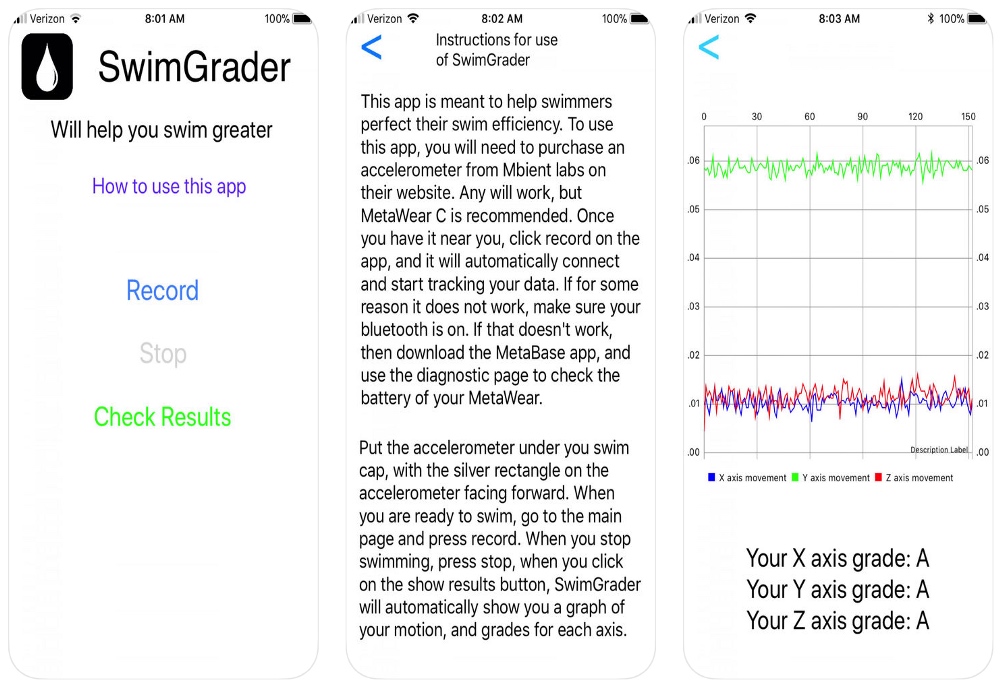 SwimGrader App Window
Introducing SwimGrader
So, after hours of programming and going through Apple to get our app approved for the App Store, we were finally able to launch SwimGrader. It was really surprising to see this, because I only helped with the initial setup of the project, which consisted of setting up a single page app Swift project and helping with adding buttons and text fields, and simple hardware integration to retrieve data from the sensor. So, after hours of programming, and getting our app approved by the App Store through Apple, we were finally ready to launch Swim Grader. It was really surprising to see this since I had only helped with the initial setup of the project, which included setting up a single page app Swift project, helping add buttons and text fields, and simple hardware integration to retrieve data from sensors.
To give a sense of how easy the hardware integration was, here is a snippet of code to make the LED on the sensor flash green. Retrieving data was just as simple, as can be seen by the example below. To illustrate how easy hardware integration is, here is a code snippet that makes the LED on the sensor appear green. Retrieving data is very simple, as shown in the example below.
import MetaWear
import MetaWearCpp
MetaWearScanner.shared.startScan(allowDuplicates: true) { (dev) in
    // We found a MetaWear board, see if it is close by
    if dev.rssi.intValue > -50 {
        // We found a MetaWear board!
        MetaWearScanner.shared.stopScan()
        // Connect to the board we found
        dev.connectAndSetup().continueWith { t in
            if let error = t.error {
                // Sorry we couldn't connect
                print(error)
            } else {
                // We are connected! Flash its LED!
                var pattern = MblMwLedPattern()
                mbl_mw_led_load_preset_pattern(
                    &pattern, MBL_MW_LED_PRESET_PULSE)
                mbl_mw_led_stop_and_clear(device.board)
                mbl_mw_led_write_pattern(
                    device.board, &pattern, MBL_MW_LED_COLOR_GREEN)
                mbl_mw_led_play(device.board)
            }
        }
    }
}
Given only a limited about of help, my student went far beyond my expectations to build a grading algorithm and a graphical interface. He retrieved the X, Y, Z data from the sensor and gave a grade on how much the head moved in each direction. He searched online for a graphing library on iOS and displayed what his sensor reported. And, after finishing his app, he went ahead and tested his app in the pool! With limited help, my students went far beyond my expectations and built a scoring algorithm and graphical interface. He takes X, Y, Z data from the sensor and gives the degree of head movement in each direction. He searches the web for graphics libraries on iOS and displays what the sensors report. After completing the application, he continued testing his application in the pool!
It is an effort by a middle school student, so it’s not going to look fancy like Clash of Clans. However, I think it is really impressive, coming from a young student who has never built an iPhone app before! After finishing this, the student asked me, It’s a middle school effort, so it doesn’t look as gimmicky as Clash of Clans. However, I thought this was really impressive, coming from a young student who had never developed an iPhone app! After doing this, the student asked me,
Can we build an Apple Watch App for this? Can we build an Apple Watch App for this?
I told him that he could definitely build an Apple Watch version of the app in the future, but that he could probably build it without my help :). I told him that he could definitely develop an Apple Watch version of the app in the future, but he probably wouldn’t need my help to do it :).
Final Thoughts
As grown-ups, I think it is really hard to keep our ideas fresh, wild and up-to-date. So, I think it’s really educational to hear what these young students have to say and to support what they want to do in all the ways we can. As adults, I think it’s really hard to keep our minds fresh, wild, and relevant. So, I think it’s very educational to hear from these young students and support what they want to do.
Not only do these opportunities open the gate to building new and exciting products, but supporting students to pitch and build their own ideas gives them the best educational experiences. Seeing my student asking people to download his app makes me smile. I am hoping that I can maybe build a cool app someday and showcase it to my friends. Although, my student just beat me to that :) These opportunities not only open the door to developing new and exciting products, but also support students in marketing and building their own ideas to give them the best educational experience possible. It makes me laugh to see my student get people to download his app. I hope one day I can develop a cool app and show it to my friends. Although, my students just beat me to it :)
On a side note, I learned that building a cool iOS app is easier than ever. There are so many articles helping you build apps for every possible purpose: games, single view apps, social network apps and many more. Also, there is more hardware than ever that you can easily hook up to your phone and extend the capabilities of your phone. By the way, I learned that building a cool iOS app is easier than ever. There are many articles to help you develop applications for all possible purposes: games, single-view applications, social network applications, and more. Additionally, there are now more hardware that you can easily connect to your phone and extend your phone’s functionality.
I hope I can soon share experiences of building my own app. I am just worried if my students will find my app cool… I hope I can share my experience developing apps soon. I’m just worried about whether my students will think my app is cool…Thank you for reading this article! I hope I can convince you to work with your students or your children and start building a simple app! I am also open to hearing about your cool app ideas. Thank you for reading this article! I hope I can convince you to work with your students or your kids and start building a simple app! I’d also love to hear your ideas for cool apps.
- This week I translated the untranslated part of the first chapter last week. The first chapter has been translated: https://dandan2009.github.io/2018/10/26/Instruments-chinese-translation/
TIPS
This week I encountered a problem with NSCharacterSet, so I studied this NSCharacterSet and found that the NSCharacterSet function is quite powerful.
NSCharacterSet
An object representing a fixed set of Unicode character values for use in search operations. An object representing a fixed set of Unicode character values used for search operations.
Overview
An NSCharacterSet object represents a set of Unicode-compliant characters. NSString and NSScanner objects use NSCharacterSet objects to group characters together for searching operations, so that they can find any of a particular set of characters during a search. The cluster’s two public classes, NSCharacterSet and NSMutableCharacterSet, declare the programmatic interface for static and dynamic character sets, respectively. The NSCharacterSet object represents a Unicode-compliant (compliant-compatible) character set. NSString and NSScanner objects use NSCharacterSet objects to group characters for search operations so that they can find a specific set of characters during the search process. The two public classes of the cluster, NSCharacterSet and NSMutableCharacterSet, declare programming interfaces for static and dynamic character sets respectively.
The objects you create using these classes are referred to as character set objects (and when no confusion will result, merely as character sets). Because of the nature of class clusters, character set objects aren’t actual instances of the NSCharacterSet or NSMutableCharacterSet classes but of one of their private subclasses. Although a character set object’s class is private, its interface is public, as declared by these abstract superclasses, NSCharacterSet and NSMutableCharacterSet. classes adopt the NSCopying and NSMutableCopying protocols, making it convenient to convert a character set of one type to the other. Objects created using these classes are called character set objects (only character sets when this is not confusing). Due to the nature of class clustering, the character set object is not an actual instance of the NSCharacterSet or NSMutableCharacterSet class, but an instance of one of their private subclasses. Although the character set object’s class is private, its interface is public, declared by the abstract superclasses NSCharacterSet and NSMutableCharacterSet. The character set class adopts the NSCopying and NSMutableCopying protocols, making it convenient to convert one type of character set to another type of character set.
The NSCharacterSet class declares the programmatic interface for an object that manages a set of Unicode characters (see the NSString class cluster specification for information on Unicode). NSCharacterSet’s principal primitive method, characterIsMember:, provides the basis for all other instance methods in its interface. A subclass of NSCharacterSet needs only to implement this method, plus mutableCopyWithZone:, for proper behavior. For optimal performance, a subclass should also override bitmapRepresentation, which otherwise works by invoking characterIsMember: for every possible Unicode value. The NSCharacterSet class declares a programming interface for an object that manages a Unicode character set (see the NSString class cluster specification for information about Unicode). NSCharacterSet’s main primitive method characterIsMember: provides the basis for all instance methods in its interface. A subclass of NSCharacterSet only needs to implement this method, plus the mutableCopyWithZone: method, to obtain the correct behavior. For best performance, subclasses should also override the bitmap representation, otherwise call characterIsMember: for all possible Unicode values.
NSCharacterSet is “toll-free bridged” with its Core Foundation counterpart, CFCharacterSetRef. See Toll-Free Bridging for more information on toll-free bridging. NSCharacterSet is “toll-free bridged” with its core base counterpart CFCharacterSetRef. For more information about toll-free bridged, see toll-free bridged.
NSCharacterSet can conveniently process strings
For example, determine whether a string begins with a number
NSString * string = "3dfdfsa";
unichar c = [string characterAtIndex:0];
if ([[NSCharacterSet decimalDigitCharacterSet] characterIsMember:c]) {
return YES;
} else {
return NO;
}
}
Two methods in NSString related to NSCharacterSet: //Clean the characters at both ends of the string according to the character set
- (NSString *)stringByTrimmingCharactersInSet:(NSCharacterSet *)set; //Split the string according to the character set separator
- (NSArray<NSString *> *)componentsSeparatedByCharactersInSet:(NSCharacterSet *)separator;
NSString *string = @“123abc123”;
string = [string stringByTrimmingCharactersInSet:[NSCharacterSet decimalDigitCharacterSet]];
NSLog(@“%@”,string);//Output abc
//字符集的二进制数据,用于传输、归档、保存成文件
@property (readonly, copy) NSData *bitmapRepresentation;


//一个除了数字字符之外的所有字符的字符集
[[NSCharacterSet decimalDigitCharacterSet] invertedSet]


//判断aCharacter是否包含在字符集中
- (BOOL)characterIsMember:(unichar)aCharacter;
//功能貌似是一样的,入参是UTF-32的字符???不知道这两个方法的区别,知道的朋友不吝赐教
- (BOOL)longCharacterIsMember:(UTF32Char)theLongChar;

//判断theOtherSet是不是自身的子集
- (BOOL)isSupersetOfSet:(NSCharacterSet *)theOtherSet;


- (BOOL)hasMemberInPlane:(uint8_t)thePlane;
Encode the string:
NSString * string =  @"11 =Essential ,Coding Interview Questions + Coding Exercises!" ;
[string  stringByAddingPercentEncodingWithAllowedCharacters:[NSCharacterSet alphanumericCharacterSet]];
alphanumericCharacterSet All numbers and letters (not case sensitive)
The result after encoding is:
11%20%3DEssential%20%2CCoding%20Interview%20Questions%20%2B%20Coding%20Exercises%21
You can see that the above result encodes all characters except all numbers and letters.
Then look at the function of invertedSet
[string stringByAddingPercentEncodingWithAllowedCharacters:[NSCharacterSet alphanumericCharacterSet].invertedSet]
The result after adding invertedSet is as follows:
%31%31 =%45%73%73%65%6E%74%69%61%6C ,%43%6F%64%69%6E%67 %49%6E%74%65%72%76%69%65%77 %51%75%65%73%74%69%6F%6E%73 + %43%6F%64%69%6E%67 %45%78%65%72%63%69%73%65%73!
You can see that only numbers and letters are encoded.
In other words, NSCharacterSet can easily specify what characters to encode. It is also possible to use characterSetWithCharactersInString for fully custom encoded characters
NSCharacterSet *dd = [NSCharacterSet characterSetWithCharactersInString@"^~_>+=\"#%/<>?@\\^`{|}"];
```Related blog: https://nshipster.cn/nscharacterset/
#### Commonly used APIs
/**  常用快捷方法集合 (常用的,已满足大多数需求) */
 (NSCharacterSet *)controlCharacterSet; //   控制字符,包括换行符(\n)、制表符(\t)等,具体有哪些,不清楚
(NSCharacterSet *)whitespaceCharacterSet; //space
(NSCharacterSet *)whitespaceAndNewlineCharacterSet;//Spaces and newlines
(NSCharacterSet *)decimalDigitCharacterSet; //0-9的数字
(NSCharacterSet *)letterCharacterSet; //All letters
(NSCharacterSet *)lowercaseLetterCharacterSet; //lowercase letters
(NSCharacterSet *)uppercaseLetterCharacterSet; //大写字母
(NSCharacterSet *)nonBaseCharacterSet; //Non-base
(NSCharacterSet *)alphanumericCharacterSet; //All numbers and letters (uppercase and lowercase)
(NSCharacterSet *)decomposableCharacterSet; //Decomposable
(NSCharacterSet *)illegalCharacterSet; //Illegal
(NSCharacterSet *)punctuationCharacterSet; //Punctuation marks refer to the symbols used to separate text
(NSCharacterSet *)capitalizedLetterCharacterSet; //大写
(NSCharacterSet *)symbolCharacterSet; // Symbol characters, except punctuation marks, such as symbols like ¥ and $
(NSCharacterSet *)newlineCharacterSet NS_AVAILABLE(10_5, 2_0);//Newline character


/**  根据一个给定的字符串获取一个NSCharacterSet对象 */
+ (NSCharacterSet *)characterSetWithCharactersInString:(NSString *)aString;

/** 相反字符串限制 【具体见接下的例子】 */
@property (readonly, copy) NSCharacterSet *invertedSet;

- characterIsMember:


NSCharacterSet这个类的功能有点类似于正则
:
https://nshipster.cn/nscharacterset/

NSString and Unicode:
https://objccn.io/issue-9-1/#peculiar-unicode-features


iOS English blog: https://nshipster.com/
The corresponding Chinese version above: https://nshipster.cn/

If you are confused about what character encoding is (even if you have good professional knowledge), then you should seize this opportunity to read and reread this classic article by Joel Spolsky: https://www.joelonsoftware.com/2003/10/08/the-absolute-minimum-every-software-developer-absolutely-positively-must-know-about-unicode-and-character-sets-no-excuses/


## Share

1.  先分享个可以查看App Store下载量比较大或比较流行的APP用了哪些第三方库的网站:https://www.appsight.io

2. 再分享几个学习算法的网站,有的视频网站,有的是带动画的:

    * Algorithm video of an Indian guy, learning English algorithm at the same time: https://www.youtube.com/channel/UCx-kFfzekMbhODaBss-ZnsA

    * Algorithm tutorial: https://notes.diguage.com/mysql/#_%E6%97%B6%E9%97%B4%E5%A4%8D%E6%9D%82%E5%BA%A6

   * Graphical algorithm: https://visualgo.net/zh
   *
    * This animation can help you understand the algorithm: https://www.cs.usfca.edu/~galles/visualization/Algorithms.html

    * Animated explanation of commonly used algorithms: https://www.toptal.com/developers/sorting-algorithms

    * This animation is also good, very cool: http://sorting.at/

3. Recommend another database course: https://15445.courses.cs.cmu.edu/fall2017/schedule.htmlWhat to read next
Want more posts about ARTS?
Posts in the same category are usually the best next step for reading more on this topic.
View same categoryWant to keep following #iOS?
Tags are useful for related tools, specific problems, and similar troubleshooting notes.
View same tagWant to explore another direction?
If you are not sure what to read next, return to the homepage and start from categories, topics, or latest updates.
Back home