iOS multithreading--GCD serial queue, concurrent queue, synchronous execution, and asynchronous execution
Queues in GCD
Due to the limited level, the following content is not guaranteed to be correct. Please read the following content with a critical eye. If you find any errors, please correct them.
1 What is queue?
Before starting GCD, let’s talk about the concept of queue, because GCD tasks are all dispatched in the queue;
Queue: It is a linear table of first-in, first-out (FIFO, First-In-First-Out). However, after adding the two attributes 串行 and 并发 in front of 队列, that is, 串行队列 and 并发队列, sometimes it is easy to be confused, especially after adding the concepts of 同步 and 异步, sometimes it becomes even more unclear.
2 Serial queue and concurrent queue
Note that it is 并发队列(Concurrent Queue), not 并行队列. See the next section for the difference between 并发 and 并行
What are 串行队列 and 并发队列? As mentioned above, 串行 and 并发 in 串行队列 and 并发队列 are attributives of 队列. You can add 的, ZXPH 00031ZX and 并发的队列; so 串行队列 and 并行队列 are still 队列 in the final analysis. Since it is 队列, it must be first in first out (FIFO, First-In-First-Out), it’s important to remember this.
串行队列: It means that the tasks in this queue need to be executed by 串行, that is, they are executed one by one. They must wait for the completion of the previous task before starting the next one, and they must be executed in a first-in, first-out order. For example, there are 4 tasks in 串行队列, and the order of entering the queue is a, b, c, d, then a must be executed first, and after task a is completed, b…
并发队列: It means that the tasks in this queue can be executed by 并发, that is, the tasks can be executed at the same time. For example, there are 4 tasks in 并发队列. The order of entering the queue is a, b, c, d. Then a must be executed first, then b…, but a may not be completed when b is executed, and it is uncertain which of a and b is executed first. How many are executed at the same time is controlled by the system (the number of concurrency cannot be set directly in GCD, it can be achieved by creating a semaphore, NSOperationQueue can be set directly), but it must also be called according to the principle of first-in-first-out (FIFO, First-In-First-Out).
4 About 并发 and 并行
The English word for parallelism is parallelism, and the English word for concurrency is concurrency.
-
Concurrency means simultaneousness in logical concepts, and parallel means simultaneousness in physical concepts.
-
Concurrency refers to the nature of the code, and parallelism refers to the physical running state.
-
Concurrency means that the start time of process B is between the start time and end time of process A. We say that A and B are concurrent. Parallelism refers to two threads running on different CPUs at the same time.
-
Concurrency is dealing with lots of things at once, and parallelism is doing lots of things at once;
-
Concurrency can be considered as a design pattern of logical structure. You can use a concurrent design method to write programs, and then run them on a single-core CPU, creating the illusion of parallelism through dynamic logic switching of the CPU. At this point, your program is not parallel, but concurrent. If you run a concurrent program on a multi-core CPU, your program can be considered parallel at this time. Parallelism is more concerned with program execution (execution);
-
For a single-core CPU, at least two CPUs are needed in parallel; but one CPU can be used in parallel, and the two tasks can be executed alternately;
To sum up: Concurrency is more of a concept in programming, while parallelism is a concept in physical CPU execution. Concurrency can be achieved in parallel. Concurrency is explained from the perspective of programming, and parallelism is viewed from the perspective of CPU execution tasks. Generally speaking, we can only write concurrent programs, but there is no guarantee that we can write parallel programs.
Concurrency and parallelism can be thought of as different dimensions. Concurrency is viewed from the perspective of a programmer writing a program. Parallelism is viewed from the physical execution of the program.
Joe Armstrong, the inventor of Erlang, mentioned in one of his blog posts (http://joearms.github.io/2013/04/05/concurrent-and-parallel-programming.html) how to introduce the difference between concurrency and parallelism to a 5-year-old child
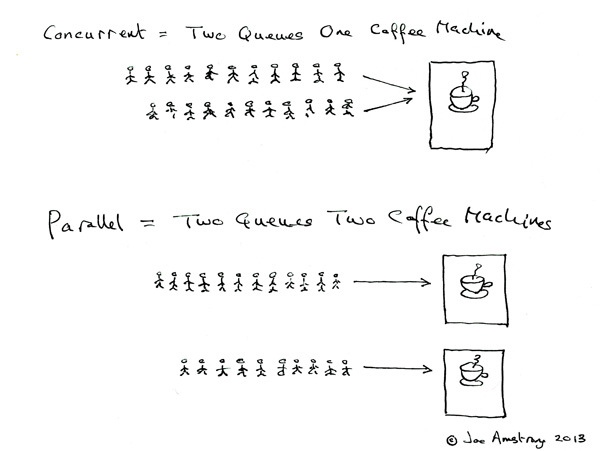
Synchronous and asynchronous
同步 and 异步 in GCD are for task execution, that is, synchronous execution of tasks and asynchronous execution of tasks. Synchronous or asynchronous describes the relationship between a task and its context
Synchronous execution: It can be understood that when a function is called (or when a code block is executed), the following code must be executed after the function (or code block) is completed. Synchronous execution generally executes tasks in the current thread and does not start a new thread.
Asynchronous: Regardless of whether the called function has been executed or not, the following code will continue to be executed. Have the ability to start new threads.
The main difference between synchronous and asynchronous is whether to return immediately when adding a task to the queue or to wait until the added task is completed before returning.
dispatch_sync(dispatch_queue_t queue, dispatch_block_t block);
dispatch_async(dispatch_queue_t queue, dispatch_block_t block);
dispatch_sync is used to add synchronization tasks. When adding tasks, you must wait until the code in the block is executed before the dispatch_sync function can return.
dispatch_async adds asynchronous tasks. When adding a task, it will return immediately, regardless of whether the code in the block is executed.
Test
- Serial queue asynchronous tasks The following code is executed in the viewDidLoad method
dispatch_queue_t serialQueue = dispatch_queue_create("Dan-serial", DISPATCH_QUEUE_SERIAL);
    for(int i = 0; i < 5; i++){
        dispatch_async(serialQueue, ^{
            NSLog(@"我开始了:%@ , %@",@(i),[NSThread currentThread]);
            [NSThread sleepForTimeInterval: i % 3];
        });
    }
输出如下:
我开始了:0 , <NSThread: 0x60400027e480>{number = 3, name = (null)}
我开始了:1 , <NSThread: 0x60400027e480>{number = 3, name = (null)}
我开始了:2 , <NSThread: 0x60400027e480>{number = 3, name = (null)}
我开始了:3 , <NSThread: 0x60400027e480>{number = 3, name = (null)}
我开始了:4 , <NSThread: 0x60400027e480>{number = 3, name = (null)}
You can see that the output is in sequence, in the same thread, and a new thread is opened.
- Serial queue synchronization task
for(int i = 0; i < 5; i++){
        dispatch_sync(serialQueue, ^{
            NSLog(@"我开始了:%@ , %@",@(i),[NSThread currentThread]);
            [NSThread sleepForTimeInterval: i % 3];
        });
    }
输出如下:
我开始了:0 , <NSThread: 0x60000006d8c0>{number = 1, name = main}
我开始了:1 , <NSThread: 0x60000006d8c0>{number = 1, name = main}
我开始了:2 , <NSThread: 0x60000006d8c0>{number = 1, name = main}
我开始了:3 , <NSThread: 0x60000006d8c0>{number = 1, name = main}
我开始了:4 , <NSThread: 0x60000006d8c0>{number = 1, name = main}
You can see that the output is in sequence, in the same thread, but no new thread is started, and it is executed in the main thread.
- Concurrent queue asynchronous tasks
    dispatch_queue_t concurrent_queue = dispatch_queue_create("DanCONCURRENT", DISPATCH_QUEUE_CONCURRENT);
    for(int i = 0; i < 5; i++){
        dispatch_async(concurrent_queue, ^{
            NSLog(@"我开始了:%@ , %@",@(i),[NSThread currentThread]);
            [NSThread sleepForTimeInterval: i % 3];
            NSLog(@"执行完成:%@ , %@",@(i),[NSThread currentThread]);
        });
    }
输出如下:
我开始了:0 , <NSThread: 0x600000462340>{number = 3, name = (null)}
我开始了:2 , <NSThread: 0x604000269380>{number = 6, name = (null)}
我开始了:3 , <NSThread: 0x604000269180>{number = 5, name = (null)}
我开始了:1 , <NSThread: 0x600000461d80>{number = 4, name = (null)}
执行完成:0 , <NSThread: 0x600000462340>{number = 3, name = (null)}
执行完成:3 , <NSThread: 0x604000269180>{number = 5, name = (null)}
我开始了:4 , <NSThread: 0x600000462340>{number = 3, name = (null)}
执行完成:1 , <NSThread: 0x600000461d80>{number = 4, name = (null)}
执行完成:4 , <NSThread: 0x600000462340>{number = 3, name = (null)}
执行完成:2 , <NSThread: 0x604000269380>{number = 6, name = (null)}
As you can see, it is executed concurrently, and more than one new thread is opened.
Did you find anything wrong here? It is understandable that the order in which execution is completed is uncertain, but why is the order in which it is started also uncertain? According to the above, the queue is first in first out, so 我开始了 should be printed in order, but the actual printing is out of order. Why? This problem has not been clarified yet. My guess is that it may be caused by the time-consuming operation of NSLog(@“I started: %@, %@”,@(i),[NSThread currentThread]);.
- Concurrent queue synchronization tasks
 for(int i = 0; i < 5; i++){
        dispatch_sync(concurrent_queue, ^{
            NSLog(@"我开始了:%@ , %@",@(i),[NSThread currentThread]);
            [NSThread sleepForTimeInterval: i % 3];
            NSLog(@"执行完成:%@ , %@",@(i),[NSThread currentThread]);
        });
    }

输出如下:
我开始了:0 , <NSThread: 0x60000007ec80>{number = 1, name = main}
执行完成:0 , <NSThread: 0x60000007ec80>{number = 1, name = main}
我开始了:1 , <NSThread: 0x60000007ec80>{number = 1, name = main}
执行完成:1 , <NSThread: 0x60000007ec80>{number = 1, name = main}
我开始了:2 , <NSThread: 0x60000007ec80>{number = 1, name = main}
执行完成:2 , <NSThread: 0x60000007ec80>{number = 1, name = main}
我开始了:3 , <NSThread: 0x60000007ec80>{number = 1, name = main}
执行完成:3 , <NSThread: 0x60000007ec80>{number = 1, name = main}
我开始了:4 , <NSThread: 0x60000007ec80>{number = 1, name = main}
执行完成:4 , <NSThread: 0x60000007ec80>{number = 1, name = main}
It can be seen that the program is not executed concurrently, and no new thread is started. It is executed on the main thread. Do you find it strange? Why do tasks added to the concurrent queue not start a new thread but are executed on the main thread? Explained below:
使用dispatch_sync 添加同步任务,必须等添加的block执行完成之后才返回。
既然要执行block,肯定需要线程,要么新开线程执行,要么再已存在的线程(包括当前线程)执行。
dispatch_sync的官方注释里面有这么一句话:
As an optimization, dispatch_sync() invokes the block on the current thread when possible.
作为优化,如果可能,直接在当前线程调用这个block。

所以,一般,在大多数情况下,通过dispatch_sync添加的任务,在哪个线程添加就会在哪个线程执行。

上面我们添加的任务的代码是在主线程,所以就直接在主线程执行了。
Are all tasks in the serial queue executed on one thread?
The test is as follows
- (void)viewDidLoad {
    dispatch_queue_t serialQueue = dispatch_queue_create("Dan-serial", DISPATCH_QUEUE_SERIAL);

  dispatch_sync(serialQueue, ^{
      // block 1
      NSLog(@"current 1: %@", [NSThread currentThread]);
  });

  dispatch_sync(serialQueue, ^{
      // block 2
      NSLog(@"current 2: %@", [NSThread currentThread]);
  });

  dispatch_async(serialQueue, ^{
      // block 3
      NSLog(@"current 3: %@", [NSThread currentThread]);
  });

  dispatch_async(serialQueue, ^{
      // block 4
      NSLog(@"current 4: %@", [NSThread currentThread]);
  });
}
  //结果如下
  //    current 1: <NSThread: 0x600000071600>{number = 1, name = main}
//    current 2: <NSThread: 0x600000071600>{number = 1, name = main}
//    current 3: <NSThread: 0x60400027bcc0>{number = 3, name = (null)}
//    current 4: <NSThread: 0x60400027bcc0>{number = 3, name = (null)}
It can be seen that the synchronization tasks added to the serial queue are executed on the main thread, which is consistent with the above conclusion (tasks added through dispatch_sync will be executed in which thread they are added). The asynchronous task is executed in a newly opened thread, and only one thread is opened.
Do the following test again:
- (void)viewDidLoad {
    dispatch_queue_t queue = dispatch_queue_create("Dan", NULL);
     dispatch_async(queue, ^{
      NSLog(@"current : %@", [NSThread currentThread]);
      dispatch_queue_t serialQueue = dispatch_queue_create("Dan-serial", DISPATCH_QUEUE_SERIAL);

      dispatch_sync(serialQueue, ^{
          // block 1
          NSLog(@"current 1: %@", [NSThread currentThread]);
      });

      dispatch_sync(serialQueue, ^{
          // block 2
          NSLog(@"current 2: %@", [NSThread currentThread]);
      });

      dispatch_async(serialQueue, ^{
          // block 3
          NSLog(@"current 3: %@", [NSThread currentThread]);
      });

      dispatch_async(serialQueue, ^{
          // block 4
          NSLog(@"current 4: %@", [NSThread currentThread]);
      });
  });
}
// 结果如下
//    current  : <NSThread: 0x604000263440>{number = 3, name = (null)}
//    current 1: <NSThread: 0x604000263440>{number = 3, name = (null)}
//    current 2: <NSThread: 0x604000263440>{number = 3, name = (null)}
//    current 3: <NSThread: 0x604000263440>{number = 3, name = (null)}
//    current 4: <NSThread: 0x604000263440>{number = 3, name = (null)}
You can see:
-
Synchronization tasks added to the custom serial queue in the main thread are executed directly in the main thread
-
Asynchronous tasks added to the custom serial queue in the main thread will open a new thread
-
Synchronization tasks added to the custom serial queue in non-main threads are executed directly in the current thread
-
Asynchronous tasks added to a custom serial queue in a non-main thread are executed directly in the current thread
Conclusion: Tasks added to the serial dispatch queue using the dispatch_sync function often run on the same thread as the context in which they are running; tasks added to the serial dispatch queue using the dispatch_async function will generally (not necessarily) open a new thread, but different asynchronous tasks use the same thread.
Test:
-
Will the main thread only execute tasks in the main queue? No, as above
-
What is the result of executing the following code? Why?
- (void)viewDidLoad {
    [super viewDidLoad];
    dispatch_queue_t queue = dispatch_queue_create("com.dan.queue", DISPATCH_QUEUE_SERIAL);
    dispatch_sync(queue, ^{
        NSLog(@"current thread = %@", [NSThread currentThread]);
        dispatch_sync(dispatch_get_main_queue(), ^{
            NSLog(@"current thread = %@", [NSThread currentThread]);
        });
    });
}
current thread = <NSThread: 0x60000006d600>{number = 1, name = main} is output, and then a deadlock occurs.
Reason: Using dispatch_sync to add tasks to the serial queue will be executed in the current thread, and the current thread is the main thread, so the first NSLog output, because the block code of the first dispatch_sync is executed in the main thread, so the second dispatch_sync is equivalent to the following writing, so a deadlock will occur. If you don’t understand why, search Google.
- (void)viewDidLoad {
dispatch_sync(dispatch_get_main_queue(), ^{
    NSLog(@"current thread = %@", [NSThread currentThread]);
        });
}
Deadlock will occur,
Question
- (void)viewDidLoad {
    dispatch_queue_t concurrent_queue = dispatch_queue_create("Dan——CONCURRENT", DISPATCH_QUEUE_CONCURRENT);
    for(int i = 0; i < 10; i++){
        dispatch_async(concurrent_queue, ^{
            NSLog(@"我开始了:%@ , %@",@(i),[NSThread currentThread]);
        });
    }
}
//运行结果如下
//我开始了:3 , <NSThread: 0x60000026e240>{number = 6, name = (null)}
//我开始了:1 , <NSThread: 0x60400027a440>{number = 4, name = (null)}
//我开始了:2 , <NSThread: 0x60000026f800>{number = 5, name = (null)}
//我开始了:0 , <NSThread: 0x60400027a400>{number = 3, name = (null)}
//我开始了:4 , <NSThread: 0x60000026e240>{number = 6, name = (null)}
//我开始了:5 , <NSThread: 0x60400027a440>{number = 4, name = (null)}
//我开始了:8 , <NSThread: 0x60000026e980>{number = 9, name = (null)}
//我开始了:7 , <NSThread: 0x60000026e800>{number = 8, name = (null)}
//我开始了:6 , <NSThread: 0x60000026e8c0>{number = 7, name = (null)}
//我开始了:9 , <NSThread: 0x60400027a280>{number = 10, name = (null)}
Why not start in order? Concurrent queues are also queues. The queue should be first in, first out. Although the order of the end of execution is uncertain, it should be determined at the beginning.
- (void)viewDidLoad {
    dispatch_queue_t concurrent_queue = dispatch_queue_create("Dan——CONCURRENT", DISPATCH_QUEUE_CONCURRENT);
    for(int i = 0; i < 10; i++){
        dispatch_async(concurrent_queue, ^{
            NSLog(@"我开始了:%@ , %@",@(i),[NSThread currentThread]);
        });
    }
    NSLog(@"");
}
//运行结果如下
//我开始了:0 , <NSThread: 0x60000027d200>{number = 3, name = (null)}
//我开始了:1 , <NSThread: 0x60000027d740>{number = 4, name = (null)}
//我开始了:2 , <NSThread: 0x60000027d200>{number = 3, name = (null)}
//我开始了:3 , <NSThread: 0x60000027d740>{number = 4, name = (null)}
//我开始了:4 , <NSThread: 0x60000027d200>{number = 3, name = (null)}
//我开始了:5 , <NSThread: 0x60000027d740>{number = 4, name = (null)}
//我开始了:6 , <NSThread: 0x60000027d200>{number = 3, name = (null)}
//我开始了:7 , <NSThread: 0x60000027d740>{number = 4, name = (null)}
//我开始了:8 , <NSThread: 0x60000027d200>{number = 3, name = (null)}
//我开始了:9 , <NSThread: 0x60000027d740>{number = 4, name = (null)}
After adding NSLog(@“”);, it starts in sequence. Why? If you know, please feel free to teach me.
What to read next
Want more posts about iOS?
Posts in the same category are usually the best next step for reading more on this topic.
View same categoryWant to keep following #iOS?
Tags are useful for related tools, specific problems, and similar troubleshooting notes.
View same tagWant to explore another direction?
If you are not sure what to read next, return to the homepage and start from categories, topics, or latest updates.
Back home